Feed on
Posts
Comments
March 25, 2021 @ 1pm
This session will focus on how to utilize different accessibility features in Google’s Chrome OS and an introduction to their practical utilization. We’ll also cover helpful Chrome Extensions that can support better access for individuals with disabilities. 

Contributed by Stephen Polacek, IT Accessibility Evaluator

A recent push by hearing health advocates, along with a public petition, has led to Zoom promising to provide closed captioning to all free accounts by the fall of 2021.  With the ongoing pandemic, services such as Zoom have come to the forefront of both work and home life.  One of the main challenges though was captioning services were only available to paid accounts.  The petition had pushed Microsoft and Google to switch their automatic captioning services to free use but Zoom wasn’t making the transition until now.

While Zoom won’t roll out the feature until the fall, they have created a form that can be used to request captioning for those with hearing disabilities.  That form is available through their press announcement: https://blog.zoom.us/update-on-live-transcription-for-free-accounts/.  The Google form is available here: https://docs.google.com/forms/d/e/1FAIpQLSccQQ2W-K8naaltkBIbuv6BfJvisy0NZS2qWIKd0gSMUWGGpQ/viewform

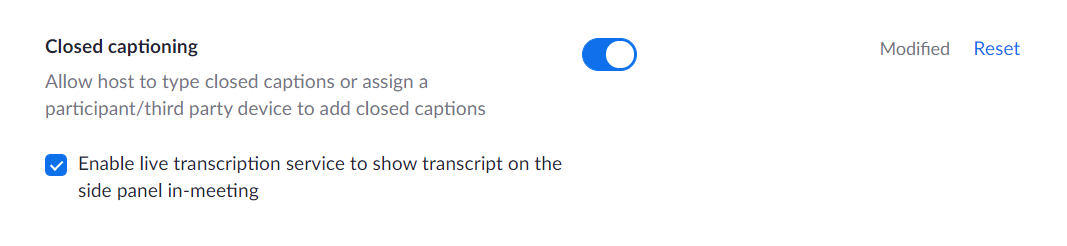
To enable closed captioning, first check your account settings.  In the “In Meeting (Advanced)” section, there will be an option to enable Closed Captioning.  Under it will be the checkbox for Live Transcription, which is the free automated version.

The Live Transcript checkbox is directly below the Enable Closed Captioning toggle option

Live Transcript checkbox under Closed Captioning

Once it’s been enabled, any meeting you start should have the option enabled on the bottom menu.  Simply click it and select LiveTranscript and your captions should be enabled.  For a more step-by-step guide, please check Zoom’s Help Center – Closed Captioning Article: https://support.zoom.us/hc/en-us/articles/207279736-Closed-captioning-and-live-transcription.

Thank you for following us!  Please check out our other pages for other topics or for upcoming webinars.

National Federation of the Blind. Click to return to Homepage.

Are you a new app developer who wants to make your app available to as many people as possible? Or maybe you’re an established developer who wants to break into a new market. Both Google and Apple provide resources for developers to utilize the accessibility features of Android and iOS to ensure their apps are usable by everyone. The National Federation of the Blind Center of Excellence in Nonvisual Accessibility, in partnership with Apple and Google, will be hosting two app development workshops. Google will present on Monday, March 15, 12:00 p.m. to 6:00 p.m. ET andApple will present on Wednesday, March 31, 1:00 p.m. to 6:00 p.m. ET. Topics to be covered:

  • How to develop accessible applications
  • Accessibility features on each platform
  • How to test your application for accessibility

Additionally, there will be limited opportunities to get feedback on your application directly from Google (Android) or Apple (iOS) engineers. Take advantage of this free opportunity, register for the mobile application development seminars today!

Accessibility boutiques and seminars are workshops presented by our access technology experts that provide introductions to accessibility best practices and the latest trends in access tech.

Help students with disabilities and their families navigate the special education system!
With the spring semester underway, do you have a good handle on what families need from you to support the educational success of their child with a disability?
 
Whether you’re a disability professional, teacher, or non-attorney advocate, our Advocacy Curriculum will help you become a stronger, more knowledgeable champion for students with disabilities and their families. You’ll learn the basic information needed to navigate the special education system, including early intervention services, individualized education programs (IEPs), Section 504, and more.
 
Purchase the curriculum for yourself or tell the families you serve about this great resource with eight easy-to-follow modules.

MDTAP in the News!

We’ve been busy talking about the Maryland AT Program with local TV and radio news outlets. Check out our most recent interviews here: 

TV: https://www.localdvm.com/news/maryland/the-maryland-assistive-technology-reuse-center-strives-to-help-all-people-with-a-disability/


Contributed by Stephen Polacek, IT Accessibility Evaluator


10-29 Blog Post – Testing Resources

For those interested in testing, or just want to learn more about accessibility in general, there are plenty of resources available.  It’s probably a good idea to compile a suite of tools you wish to use during your testing process so that you have everything at the ready.  To get you started, here’s a sample of my process for testing, based off of WCAG.  I typically start with manual testing, unlike the recommendations of Deque and the like, because of my position. 

  1. Establish the logical structure of the site
    1. Determine what headings exist, what level of heading they are, and any inconsistencies between levels (example: no <h2> on a page with <h1> and <h3> tags; multiple <h1> tags; etc.)
    2. Look for landmark markup (I use NVDA but any screen reader will have an option to pull up the list of landmarks)
    3. Go through the TAB order manually and follow the cursor to determine any inconsistent jumps (example: going from column to column left-to-right instead of reading a whole column first)
  2. Check for text alternatives for non-text content
    1. While this can be done by an automated test, I prefer handling it manually so I can determine if the alt text is descriptive enough, especially for images used as links
    2. Because a lot of content from other sites, such as social media, is not totally under the website’s control, having a description or another element with the same information becomes important
    3. Videos and Audio should have captions or a transcript – typically I only look at a single element if multiple are available on the site, as this becomes a serious time commitment
  3. Best Practices
    1. Using native HTML elements, especially HTML5 – I will often recommend switching elements that are created via scripting to be switched to HTML5, as this makes accessibility more intrinsic and makes future content easier to make accessible
    2. Skip to Main Content Links – fairly common, but typically are hidden and only viewable to screen readers, Skip to Main Content links actually benefit other users as well, such as those using voice commands or those with physical disabilities; I will recommend making these visible for all users
    3. Responsive Design – making the website respond to different viewports while keeping all content in the same order; this is becoming very important and the standard design format as so many different devices are now used to access websites
  4. Automated Testing
    1. Chrome extension aXe (from Deque) or WAVE (from W3C) – These are good for finding code errors or creating more exhaustive lists of errors; make sure to double check issues in case it points out something that is more subjective
    2. Accessible Color Picker (Chrome extension) – not an actual automated tool but useful for double checking color contrast issues listed by aXe or WAVE
    3. Photosensitive Epilepsy Analysis Tool (from the University of Maryland) – only useful in specific instances, but definitely needed to test any content that flashes more than a couple times per second

As I mentioned, this is not a complete process; my job typically requires a cursory review to establish if a website is in need of remediation or not.  A complete testing process will include all of the WCAG guidelines and which standard is to be met.  However, the tools linked for the automated section are good starting points for seeing what needs to be done and for testing your own website. 

If you’re are using a content management system, such as WordPress, you might be limited in what you can do for accessibility.  Remember, do everything you can to ensure your part is done in the process.  With that, you can reach out to the developer of whatever system you’re using and push them to do what needs to be done on their end to reach compliance.

If you’re looking for more accessibility resources, check out our main IT Access Initiative page: http://mdod.maryland.gov/news/Pages/Web-Accessibility.aspx.  We offer a list of resources on accessibility and a schedule of our upcoming training sessions. 
« Newer Posts - Older Posts »

MDTAP | 2301 Argonne Drive, Room T17 Baltimore, Maryland 21218| Voice: 410-554-9230 Toll Free ⁄ Voice 1-800-832-4827|Email: mdtap@mdtap.org