Feed on
Posts
Comments

Join the Maryland AT Program for the second webinar in our webinar series focused on assistive technology in the workplace for seniors and people with disabilities!

This series will focus on a range of topics from AT integration (types of AT, how to use it, and when) to understanding the laws surrounding AT and Aging, how to receive AT services, and when to refer someone for AT services to improve workplace independence. You’ll learn about resources, referral processes, and AT services to improve employment outcomes. This session will also include a basic overview of AT that can be integrated at work and home.

June 16, 2021 @ 1pm EST

Register Here!


Don’t miss out on these fabulous upcoming online events from the MD Department of Disabilities and the National Federation of the Blind!

Monthly Webinar – Social Media Accessibility 103

Learn the best practices for making your social media efforts reach the broadest possible audience by making them accessible. This webinar includes tips on alt text, captioning, and post labels.

Wednesday, June 16, 1:00 – 2:00 p.m. eastern time.

Register here

NFB Boutique – Getting the Most Out of Microsoft Office with a Screen Reader

Mastering the basics of Office may be easy, but using its advanced features with a screen reader can become tricky. Even if you begin as a novice, during this seminar you will progress toward becoming an advanced user in Word, Excel, PowerPoint, and Outlook.

Wednesday, June 16, 1:00-5:00 p.m. eastern time.

Register here

NFB/MDOD Joint Boutique- Gaming for Everyone

With all the stress of work, school, and daily life, it is important to take time out to relax and unwind. One excellent way to do this is through gaming, and the number of accessible options is increasing all the time. Come to our Gaming for Everyone boutique and learn about accessible gaming options on computers, phones, and consoles.

Tuesday, June 29 from 2:00-3:30 p.m.

Register Here

Other Accessibility Events

These are events and webinars happening outside our organization that might interest you.

NFB Free Seminar on Android App Development – June 9th

IAAP Accessibility in Employment Processes Free Webinar – June 16th
The National Federation of the Blind is offering a free seminar on Android App Development on June 9, 12:00-6:00 p.m. EST, via Zoom! 

 Learn about building more accessible Android apps with the development resources and built-in features from Google. Ensure your apps are usable by everyone. The National Federation of the Blind Center of Excellence in Nonvisual Accessibility, with Google, will be hosting an app development workshop on June 9 from 12:00 to 6:00 p.m. EST. Accessibility engineers will discuss a wide range of topics to allow developers to design, develop, and test apps with accessibility in mind. Topics to be covered:

  • Android accessibility features
  • How to develop accessible applications
  • How to test your application for accessibility

Additionally, there will be limited opportunities to get feedback on your application directly from Google engineers.

Register today for this free event!


New Video Magnifier!

Hey guys!

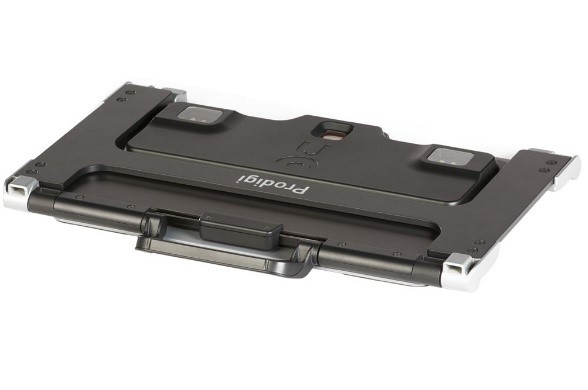
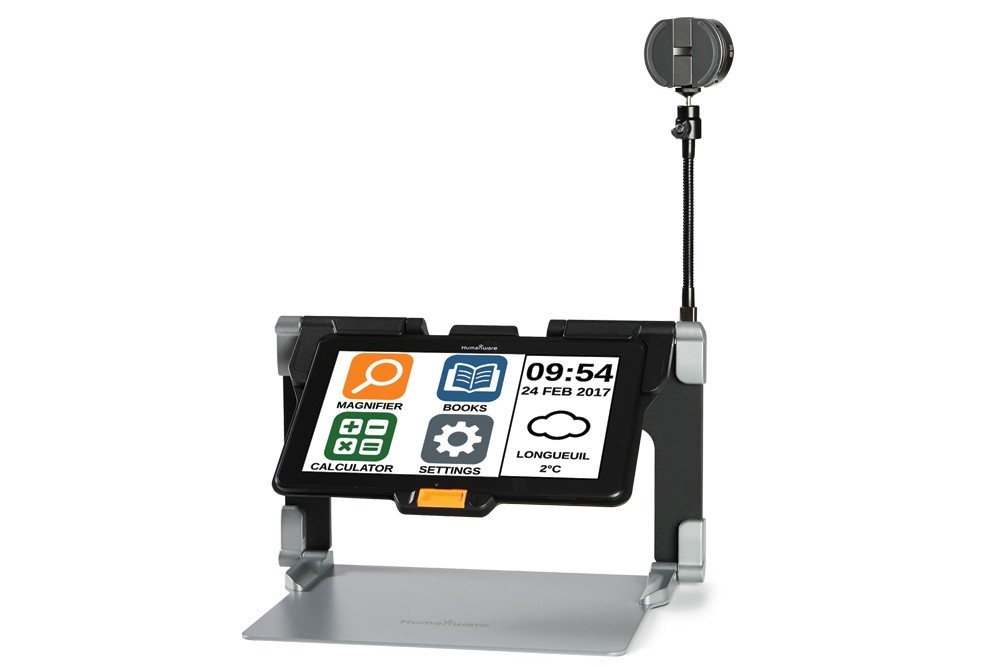
I wanted to highlight this new super cool video magnifier: The Humanware Connect 12! This has the ability to magnify text that is placed underneath the tablet piece on the grey mat or you can use the distance camera mounted on the right side for looking in any direction you point it! This can help with seeing across the room, or even turning it back around and pointing it at yourself for doing make-up or anything in between. Magnification is not all this device can do either – It also has OCR capabilities (text-to-speech) so it can read aloud text that is presented underneath the camera. This device is very versatile and even has WiFi capabilities to upload documents etc. to the cloud. This device comes equipped and ready to use apps like Dropbox , Google docs, and more. This can be great for individuals of all ages and sizes with varying levels of visual abilities. Can even be helpful for someone who is dyslexic with reading. This device is much easier to carry than some other companies /devices. It folds down nice and compact and has a carrying handle (see image).This is a photograph of the video magnifier. It has the distance camera attached to the right side. The screen has 4 apps up which are: the magnifier app, the "books" app, the calculator app, and the settings app. On the right side of the screen it reads "09:54 24 February 2017." This image depicts the humanware connect 12 collapsed in it's "carry mode." This collapses almost completely flat with a handle appearing at the top for ease when carrying.

Check out their website to find out more here: https://store.humanware.com/hus/connect-12-electronic-magnifier-new-gen-distance-viewing-10x.html

And – as always, don’t hesitate to reach out to me at james.whitney1@maryland.gov or call my office line at 410-554-9276 to find out more info or to potentially receive this device on loan for 30 days!

-James

Don’t miss out on your opportunity to share your thoughts on the Fiscal Year 2022-2025 State Plan on Aging! This is a framework for federal funding to develop programs and services for older Marylanders. The public is welcome to review and comment on the upcoming plan through June 21, 2021. 

There are several ways you can provide comments:

Mail:      

Maryland Department of Aging

301 W. Preston Street Suite 1007

Baltimore, Maryland 21201

Attention: State Plan Feedback

Email: 

mdoa.executiveoffice@maryland.gov

Online Form: 

https://forms.gle/eV5SDojtxwagvoKF8

Virtual Town Hall Meetings:

These sessions are designed to provide the opportunity for older adults, caregivers, professionals, and other stakeholders to offer public comment on the draft Maryland Department of Aging FY 2022-2025 State Plan on Aging. All interested individuals are welcome to select and register to attend one of the following “repeat” events:

May 26, 2021: 10am-11:30am

May 27, 2021:  2pm-3:30pm

June 1, 2021:   6pm-7:30pm

To register:

http://bit.ly/MDOAVirtualTownHall

or call 410-767-4170

You may also complete a brief survey by clicking here: https://www.surveymonkey.com/r/JQDTVG2

ARIA and Labelling

ARIA is a very useful tool for making websites accessible but it can be confusing at times.  One of the main issues I come across when testing is the improper use of ARIA for labelling and describing.  Therefore, this post will try to explain the differences and the situations where you should use them.

  1. Aria-label: This attribute provides a label for an element. It does not provide any visible indication of this label. 
    1. Aria-label is best used for providing information on interactive or image elements. Since it is not visible, it is important to recognize that this only provides information to screen readers. 
      1. This includes things like links, tables, and charts when it feels appropriate. One example is when providing a link with an agency name that a screen reader might not pronounce correctly (such as MDOD).  In this instance, providing an “aria-label=Maryland Department of Disabilities” on the link helps screen readers properly announce content.
    2. Aria-labelledby: This attribute associates an element with another element that will act as a label. Effectively, it is a programmatic link between two elements.
      1. Aria-labelledby’s advantage over aria-label is that it uses a visible element to label another. So it is best used when you are intending to provide a visual description of an image or a form field.
        1. Aria-labelledby works the same way as a HTML <label> element in that it needs a unique ID to work. The best practice is to use a <label> element with the aria-labelledby attribute attached to cover all bases.
      2. Aria-describedby: This is a very similar attribute to aria-labelledby; it works in the same way but is intended for larger descriptions rather than a concise “label.”
        1. Aria-describedby is best used for more complex elements, such as charts and infographics. Note that this is still a string that will be read in a single go to screen readers, so don’t try to cram an entire dataset into it.

In most cases, you want to pair these attributes with HTML tags such as <label> and <longdesc> since some user agents (i.e. browsers, assistive technology) don’t interpret ARIA.  Most screen readers will only use one or the other (i.e. NVDA chooses aria-label over <label>).  Please note that this is not a replacement for the “alt” attribute for images.  It is still necessary and best practice to provide alt text on <img> elements.

For more information and examples on these ARIA attributes, please look at the W3’s site.

  1. https://www.w3.org/TR/wai-aria/#aria-label
  2. https://www.w3.org/TR/wai-aria/#aria-labelledby
  3. https://www.w3.org/TR/wai-aria/#aria-describedby

There will be more to come on other ARIA attributes, since ARIA is a really powerful tool.  Please continue to follow us!

« Newer Posts - Older Posts »

MDTAP | 2301 Argonne Drive, Room T17 Baltimore, Maryland 21218| Voice: 410-554-9230 Toll Free ⁄ Voice 1-800-832-4827|Email: mdtap@mdtap.org