Feed on
Posts
Comments

National Federation of the Blind logo and tagline live the life you want

Linux administration is a high-demand job skill offering competitive pay, which is easily accessible for blind people. In addition, most existing training is also accessible without having to add special instructions for how to use Linux with a screen reader. The NFB has answers about what resources can get you started.

The National Federation of the Blind is excited to present an accessibility boutique all about Linux on Tuesday, June 28 from 9:00 to 10:30 a.m. eastern time, the Center of Excellence in Nonvisual Accessibility will present David Hathaway to share the ins, the outs, and the whys about this powerful, free operating system. David runs a school in Malaysia which teaches Linux administration to blind people, preparing them to sit for the LPI Certification, as well as for diverse jobs in information technology.

Take advantage of this free opportunity. Register today!

Protestors using wheelchairs protesting in favor of buses that accommodate people with disabilities.

Disability Rights are Civil Rights: How the Civil Rights Movement Impacted the
Disability Rights Movement
Thursday July 14, 2:00 pm to 3:30 pm ET
 
The 1960s Civil Rights Movement had significant impact on politics and culture in the United States and laid the groundwork for other sociopolitical movements.
 
This webinar will feature disability rights activist and author Judy Heumann, together with a speaker on the history of civil rights. They will discuss the ways that the Civil Rights Movement impacted and influenced the Disability Rights Movement that began in the 1970s.
 
They also will offer their thoughts on how both movements have led to current conversations around the intersectionality of race and disability.
 

Contributed by Elijah Dawson

The Maryland Assistive Technology Program does not specifically endorse the programs and technology listed in this article. To schedule a free Assistive Technology Consultation, please contact us at mdtap.general@maryland.gov or call 410-554-9230. Visit us at www.mdtap.org to learn more about our services.
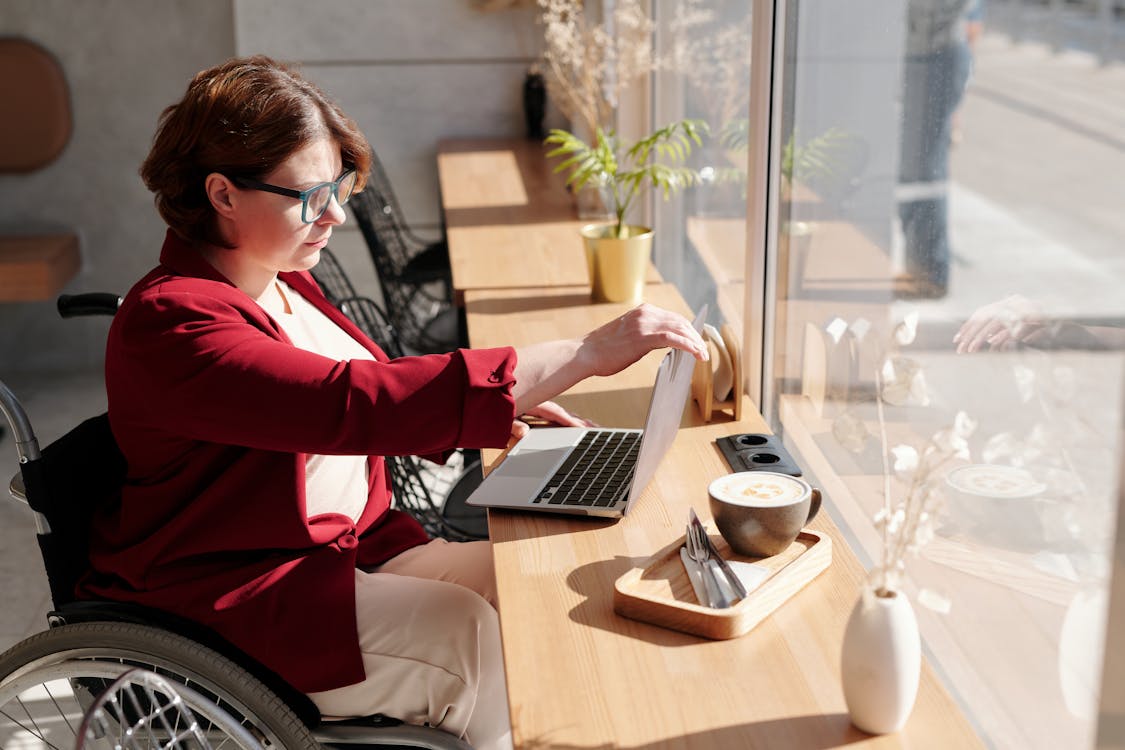
Woman with short, brown hair wearing blue-rimmed glasses and a red cardigan sits in her wheelchair and works at her laptop in front of a large window. Sunlight pours in.

Top Tips to Help Individuals with Disabilities Use Technology to Promote Career Success

With so many changes happening at lightning speed, the world of technology can be mind-boggling. But it’s worth slowing down and taking a hard look because modern tools can help simplify tasks, enhance access to services, and streamline daily life—especially for people with disabilities. Regardless of your skill level or disability, the Maryland Department of Disabilities shares these technology tips that can help you to advance, expand, and remove barriers to your career.

Advance on Your Career Path with Confidence

Continuing to hone your skills is an excellent strategy for progressing in your career. Luckily, the days when long commutes and sitting in a classroom were the norm are far gone. Today, anyone can attend college or enroll in supplemental courses from home via their smart devices. Even if your career path doesn’t involve a four-year degree, you might find that certifications or online seminars are the perfect fit for rounding out your professional skills.

Colleges & Universities

Remote learning for career advancement may involve a structured college degree. Virtual university programs are a solid option for many online learners. You can earn an associate’s or bachelor’s degree, or even an online master’s degree if you meet the prerequisites for acceptance into accredited university programs.

Don’t let expensive tuition stop you, either. There are countless scholarships for adults with disabilities, including government grants, state-based scholarships, and more.

Online Courses & Certifications

Low-cost courses also offer real-world lessons and perspective without a high up-front cost. For example, learning about any topic imaginable is easy and cheap with platforms like Udemy, where classes start at $12.99 (but often drop lower with promotions and special offers).

Even Harvard University delivers free online courses via edX on topics ranging from Digital Humanities to Finance and even Entrepreneurship. If you utilize the free course, you won’t receive formal college credit, but you can still cite class completion on your resume or professional profile.

Career Coaching

One-on-one career coaching can reignite your passion for your professional life. Inspired coaching helps you explore (and prepare for) new opportunities—or set out on your own if that’s what speaks to you. Video chatting also makes meeting with your career coach easy and convenient.

Start a Business

If you can’t quite find the right job for your abilities and passions, consider starting your own! There are many resources, including online start a business guide books that can help you to determine the type of business you want to create. These guides can also show you how to write a business plan (a very important part of the process), select a strong business name, and register your business in the state where you live. Then, let your passion – and your strategy – form as you begin to build your business and your brand..

Expand Your Professional Horizons (Independently)

Career growth is always a desirable goal, but what if your current path isn’t what you envisioned? Whether it’s dealing with a challenging work environment or simply that you’re stuck in a workplace where your skills are undervalued, there are alternatives to traditional career paths.

Working at home is one way to skip many stressors of the traditional work environment, notes NPR, especially if your disability presents mobility challenges. From skipping a commute to being able to save money on eating out at lunchtime, telecommuting or choosing other home-based business opportunities could be the key to a long and successful career.

If you’re exploring ways to work via home, technology provides plenty of options. Work-at-home jobs accommodate people of all abilities and talents, and your choices include everything from customer service to data entry. Consider these technology-supported niches for your next job search:

Virtual assisting: You perform tasks for businesses as an administrative assistant, but remotely from your home.

Customer service via phone or video chat: You handle customer calls and resolve billing issues, sign people up for service, and more.

Data entry: Many companies hire data entry workers to collect and organize information.

Writing: Freelance writing spans all industries and niches, or you can explore writing eBooks that you upload directly to sites like Amazon for quick sales.

Coding: Learning a coding language allows you to create programs, apps, and more for businesses or individuals.

Translation: Whether you speak multiple languages or are fluent in American Sign Language, translation could be a solid career choice. Live translation services could also be ideal for those who are bilingual.

Social media: Being able to navigate social media and develop a devoted following is no easy task. If you have influencer abilities, you could monetize that skill by posting on social media pages for big brands that pay for likes, followers, and subscribers.

Many other jobs can be done from home, too—everything from sales to product assembly to teaching can happen from your living room or home office. Just be sure to watch out for work-from-home scams while surfing the web for your next opportunity.

Once you’ve targeted work-from-home opportunities that fit your skill set, it’s time to put a resume together to showcase your skills, experience, and achievements. You can create an impressive and appealing resume by using a free resume builder. Choose a template, edit in your content, and share via your preferred format.

Employ Assistive Technology to Simplify Tasks

No matter what type of disability you have, you already know that many aspects of business cater to non-disabled people. Indeed, many companies don’t seem to consider accessibility, whether it’s their offices, processes, or technology. While there’s no widespread solution to pushing organizations toward inclusivity, assistive technology can help bridge the gap. Check your local library and government offices to see what accommodation tools and services they may provide.

Consider these tools to streamline your work tasks and eliminate barriers:

Speech generating devices: Speech generating devices have come a long way in the last decade or more. While many standalone speech devices are available, modern technology also offers a range of apps and programs professionals can use on their work or personal devices.

Screen readers: Screen-reading devices make websites accessible for people with low vision, notes the Bureau of Internet Accessibility. They achieve this by reading the text aloud and describing images, too.

Voice assistants: Your voice companion—whether it’s Alexa, Google, Siri, or any other—can arrange your calendar, call colleagues, save important information, and set reminders for tasks. People of all abilities can use voice assistants for a range of scenarios, both at work and home.

Voice recognition software: While voice assistants can be standalone devices or operate from your smart devices, voice recognition is also available for computers. You can operate your device hands-free.

Productivity apps: Regardless of your disability, a productivity app can be a godsend when it comes to managing your time and meeting deadlines. Good Housekeeping recommends apps like Todoist, Trello, Evernote and several others.

Miscellaneous tools: In addition to productivity apps, look for other digital tools that can help you stay on track or expedite sending deliverables. Toggl Track is a great tool for tracking your time, and Google Suite’s business version comes with a host of features that can bolster your efforts. 

While everyone experiences challenges in the workplace, professionals with disabilities often encounter bigger barriers to success. Whether a lack of accommodations make it hard to navigate your daily workflow or you need an opportunity that permits working from home, these technology solutions can support a path forward.


Green Enter Key with text "Learn"
Don’t miss our next IT Accessibility session: Basic Web Accessibility – Guidelines, Techniques & Testing! Join our very own Andrew Drummond as he partners with the NFB to introduce you to the laws and guidelines that define accessibility as well as the methods you can use to test your website. This session will also include a demonstration of how a screen reader interprets a website.
 
Friday, June 24th, 1:00 – 2:15 p.m. eastern time
 

Contributed by David Clark

It’s a common misconception that we must give up our independence and move into a nursing home or retirement community as we age. With the proper safety precautions in place, many seniors can comfortably live at home for years to come.

In this article, we will discuss some of the most common dangers that seniors face within their homes and suggest five ways that you can help to mitigate these risks.

The Dangers of Living Alone

Seniors face many dangers within their homes. Here are four common hazards in a senior’s home:

Falls

According to the National Institute on Aging, falls are the leading cause of fatal and non-fatal injuries among older adults. Falls and injuries usually happen in places with slippery surfaces, such as bathrooms or stairs.

To prevent falls, it is essential to make sure that all areas of the house are well-lit and free of clutter. In addition, seniors should wear supportive shoes with nonslip soles and install handrails on both sides of stairways.

Fires

Unattended cooking is one of the leading causes of home fires in the United States, and seniors are more likely to start these fires than any other age group. It is important never to leave cooking food unattended to prevent kitchen fires.

In addition, seniors should keep their stovetops and countertops clear of clutter and install a smoke detector in their kitchen.

Poisoning

Every year, thousands of seniors are hospitalized for accidental poisonings. The most common type of poisoning occurs when people take the wrong medication or accidentally take too much of their medication.

To prevent this, it is vital to keep all medications out of reach of children and pets and to always read the labels carefully before taking any medication.

Home hazards

Common home hazards include loose rugs, electrical cords, and cluttered walkways. These can all contribute to falls.

It is essential to remove all loose rugs from the home and tape down or tuck away any electrical cords to prevent accidents. In addition, seniors should make sure that all walkways are clear of clutter.

Keeping Your Home Safe

Here are five ways to help mitigate these risks and keep your senior loved one safe at home:

Have a conversation about safety

It’s extremely important to have an open and honest conversation with your loved one about the potential risks of living at home. This conversation should include a discussion of the dangers outlined above and any other risks that are specific to their health and home.

Make sure their home is well-lit

Good lighting can help prevent falls and make it easier for seniors to spot potential hazards. All areas of the home should be well-lit, especially hallways, stairways, and bathrooms.

Do a home safety check

Walk through your loved one’s home with them and look for any potential hazards. Remove anything that could cause a fall, and make sure electrical cords are out of the way.

Install safety devices

Many commercial products can help seniors stay safe at home, such as fall alarms, carbon monoxide detectors, and home security systems.

Another thing you could do is Install grab bars in the shower and next to the toilet can help prevent falls. Handrails on both sides of stairways can also help seniors stay safe.

Check-in regularly

Even with all the precautions in place, it’s still important to regularly check in on your loved one. This may help you spot any potential problems early on.

Keeping Yourself Safe

In addition to taking steps to keep your loved one safe, it’s important to also take steps to keep yourself safe. Fortunately, there are a variety of assistive technologies that can help.

Hearing Aids

If your loved one has difficulty hearing, a hearing aid can make it easier for them to communicate with you and spot potential hazards. Hearing aids can also help prevent falls by allowing seniors to hear approaching footsteps and other environmental sounds.

Medical Alert Devices

There are many different types of medical alert devices available, ranging from simple pendants to more complex systems that can call for help in the event of a fall or other emergency. These devices can give seniors and their families peace of mind knowing that help is always just a button press away.

Chairlifts

If a senior has difficulty getting up and down the stairs, a chairlift can help them stay in their home without putting themselves at risk. Chairlifts can also be used to transport heavy items up and down the stairs, which can help prevent falls.

Voice Command Devices

There are a variety of voice-activated devices that can help seniors with everything from turning on the lights to calling for help in an emergency. These devices can be a great way to help seniors stay independent and safe in their homes.

Video Doorbells

A video doorbell can help you see who is at the door without having to open it, which can be especially helpful if you live far away from your loved one. Video doorbells can also help you keep an eye on your loved one’s comings and goings, and can even be used to check on them if you’re worried about their safety.

Wrapping Up

Keeping your home safe for seniors doesn’t have to be complicated. By taking some simple precautions and being aware of the dangers that seniors face, you can help your loved ones stay safe and comfortable in their own homes for years to come.

What other safety precautions do you take to keep your senior loved one safe at home? If you found this article helpful, check out our blog for more great content like this. Also, don’t forget to share this article with your friends and family!


David Clark is the CEO of Basement Guides with several years of experience in basement-related problems and home safety. He has written and published many resources and guides related to senior home safety, grants, and home modifications. David is currently working to spread the word about senior home safety and health through resourceful guides and articles. 

Green Enter Key with text "Learn"
Don’t miss our next IT Accessibility session: Basic Web Accessibility – Guidelines, Techniques & Testing! Join our very own Andrew Drummond as he partners with the NFB to introduce you to the laws and guidelines that define accessibility as well as the methods you can use to test your website. This session will also include a demonstration of how a screen reader interprets a website.
 
Wednesday, June 22nd, 1:00 – 2:15 p.m. eastern time
 

« Newer Posts - Older Posts »

MDTAP | 2301 Argonne Drive, Room T17 Baltimore, Maryland 21218| Voice: 410-554-9230 Toll Free ⁄ Voice 1-800-832-4827|Email: mdtap@mdtap.org