Feed on
Posts
Comments

A recent addition to the Assistive Technology Loan Library is the BraillePen12.  As the name implies, the BraillePen12 is a small braille display with 12 cells of refreshable Braille.  While it can connect to computers running a compatible ScreenReader, the main purpose of the BraillePen is to provide Braille output to portable devices.

Setting up the BraillePen12 to work with an iOS device took under a minute.  Instructions are provided for connection with both Nokia and Windows Mobile cellphones. Additionally, a standard Perkins-style keyboard allows for text entry and control of the host device.  Scrolling of the display can be done either with the buttons on either side of the Braille cells, or with the small joystick located at the center of the top panel.

The BraillePen can augment or replace the audio interface entirely.  A refreshable Braille interface is attractive to many users who want to take notes during a lecture or conversely  read notes while giving a presentation. Compact Braille displays have also become popular with those who wish to read using one of the many book reading apps available on iOS devices.

Several Braille displays are available from our Assistive Technology Loan Library.  Contact an Assistive Technology Specialist for further information or to arrange for a demonstration.

Radio Captioning

Towson University and NPR Help Make Radio Accessible for Deaf, Hard-of-Hearing, and Deaf-Blind Audiences

Because it is entirely audible, radio has typically been an inaccessible medium for persons who are deaf, hard-of-hearing, and deaf-blind.  Not only are persons with auditory limitations unable to enjoy the same radio broadcasts as others, they were unable to access important alerts and information broadcast during emergencies.

However, researchers in Maryland have been working to make radio accessible. In 2008, Towson University collaborated with NPR Labs, the research division of National Public Radio, to create the International Center for Accessible Radio Technology (iCART), which is headquartered at Towson University.  iCART’s mission is to “design and advocate for accessibility features to be included as radio broadcasting accelerates the global transition to digital transmission.” To learn more about iCART, visit i-CART’s website. http://www.i-cart.net/

One significant development in radio accessibility is radio captioning, which translates the broadcasts from speech to text in real-time.  Here are some of the recent developments that are making NPR broadcasts accessible:

Radio Captioning – Radio captioning work similarly to closed captioning on television. Words and sounds that make up the NJPR broadcast are translated into text. This text can then be broadcast over a dedicated radio channel to a special radio with a built-in screen, which shows the text as it is being translated and transmitted. These services are also available over the Internet as well as a dual-screen radio captioning device. Designed for use in cars, this device allows the passenger to follow the captioned NPR broadcast and allows the driver to listen to the broadcast at the same time. The side of the screen facing the driver’s side provides the captioning for what is being played on the radio broadcast. Since, of course, the driver can’t read a broadcast while driving, the part of the screen on the driver’s side shows the driver a real-time image of the car’s location (providing GPS assistance). The device also broadcasts the radio program audibly.

Braille radio – Beginning in the summer of 2011, NPR Labs debuted its work in developing Braille radio. As with radio captioning, this device would provide a written caption for the radio broadcast – only instead of presenting it as text on a screen, the radio would be compatible with a refreshable Braille display. A deaf-blind user could plug in their own refreshable Braille display to the radio and follow along with the broadcast in real-time.

For information on the history of radio captioning, click here http://www.nprlabs.org/research-ar.html

For more information on the recent work done with Braille captioning, click on this link for the story from an NPR affiliate. http://www.wvxu.org/news/wvxunews_article.asp?ID=8926

And follow this link for information on the award-winning contributions made by Towson University faculty to radio captioning. http://www.towson.edu/main/abouttu/newsroom/sheffield101510.asp

AT in the news for the week of October 24th-28th

A Smartphone Dock for your Arm? Why Not?

M-Enabling Summit 2011 to Showcase Global Emerging Market for Mobile Apps

HomeCEUConnection to Host Live, Interactive, Seating and Positioning Webinar Series

High-Tech Shoes Aim To Stop Wandering Alzheimer’s Patients

Comparing iPhone compass with Braille compass

Sony introduces technology geared for hearing and visually impaired audiences

10 things blind people can teach us about Apple’s Siri on the iPhone 4S

Alpine Access Expands Relationship with NTI to Hire Hundreds of Americans with disabilities

Unique Mobility Products from University of Utah Program Enhance Lives of the disabled

Engineering students aid disabled community

Videos: Murata’s Self Balancing Powered Walker is Perfect For the Elderly

Technology-using major spy agency hires people with disabilities, why not other agencies?

Apps for Autism: Communicating on the iPad

App May Help Nab Handicap Parking Violators


Section 255 of the Telecommunications Act of 1996 authorizes the FCC to implement and enforce rules requiring telecommunications equipment manufacturers and service providers, whenever possible, to make their products accessible to persons with disabilities. When it is not possible to make specific products accessible, the products should be made compatible with other common accessibility devices.

What kinds of devices and services are covered by Section 255? 

In general, these rules cover devices and services people would use in their homes or offices.

Devices:

  • All hardware and software telephone network equipment
  • Telephones
  • Fax machines
  • Answering machines
  • Pagers
  • Services
  • Regular telephone calls
  • Call waiting
  • Speed dialing
  • Call forwarding
  • Computer-provided directory assistance
  • Call monitoring
  • Caller identification
  • Call tracing
  • Repeat dialing
  • Voice mail
  • Interactive voice response (phone systems that provide calles with menu options)

What does it mean to make these devices and servces accessible?

When possible, these devices and services should be able to be accessed by persons with different types of disabilities, particularly
visual or auditory disabilities. For instance, if a device such as a telephone or a pager would be considered accessible if it had both visual and audio controls for inputting information or retrieving messages.

When it is not possible to make the device or service fully accessible, companies should try to make them compatible with other devices or services that provide accessibility.  For instance, a telephones that provide only auditory output should be made
compatible with teletypewriters (TTYs), visual signaling devices, and amplifiers so that the may be utilized by persons who are deaf or hard of hearing.

In addition, Section 255 requires that product and service companies make their documentation, instructions and user guides, technical support hotlines, billing services, and other customer services accessible to all users.

What does Section 255 have to do with the internet?

The FCC has determined that Section 255 applies to Voice over Internet Protocol (VoIP). VoIP refers to technology that allows users to make telephone calls or send faxes, text messages, or voice messages over the internet.

Last year, Congress passed the 21st Century Communications and Video Act, which provides important updates to Section 255.
It also expands accessibility requirements to many modern technologies, such as internet video and mobile devices. The AT Blog will be discussing these new rules in next month’s Wednesday blog posts.

Click on these links if you’d like to read the FCC’s guide to Section 255

[http://www.fcc.gov/guides/disabled-persons telecommunications-access-section-255]

or the U.S. Access Board’s guide to Section 255 [http://www.access-board.gov/telecomm/rule.htm].

Click here if you’d like to read the full text of Section 255 of the Communications Act, courtesy of the American Federation for the Blind [http://www.afb.org/Section.asp?SectionID=4&TopicID=327&DocumentID=3574].
For the second year in a row, MDTAP is excited to be a part of the MDA Make A Muscle Conference being held at Howard Community College on Saturday, October 29th. This year we’ll be hosting two, back-to-back presentations on assistive technology for those with MD. Our presentation will include resources and services through our program as well as a hands-on opportunity to try out some of the hottest new AT items in our inventory. And if you aren’t available to make this event, feel free to arrange a demonstration with our AT Specialists by calling 1-800-832-4827 or email mdtap@mdtap.org.

Featured AT

This week, MD TAP will be taking part in the MDA’s Annual Make A Muscle conference. We’re looking forward to sharing more tidbits about our presentation in an upcoming post this week, but thought it might be interesting to share a few AT items in our lab that could be useful to those with MD.

And if you’re intersted in seeing or trying any of these devices, contact us at 1-800-832-4827 or  mdtap@mdtap.org.

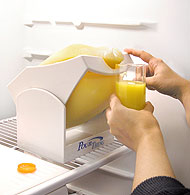
The Pour Thing – An easy-to-use pouring assistant, the Pour Thing holds both gallon and quart bottles, making it easy to tilt forward to pour a drink without having to put stress or strain on the hand, wrist and arm.

The Pour Thing


The Telestik Reacher – The Telestick reacher can come individually or in a dual stick, allowing the user to extend the device to pick up paper (with a sticky pad that leaves to residue on the items it lifts), a pointer to pull things closer, and a magnet that can lift up to one pound. Though it doesn’t include a grab claw (as most people are familiar with) this reacher enables users to pick up items that may not be possible to access with a more traditional reacher.


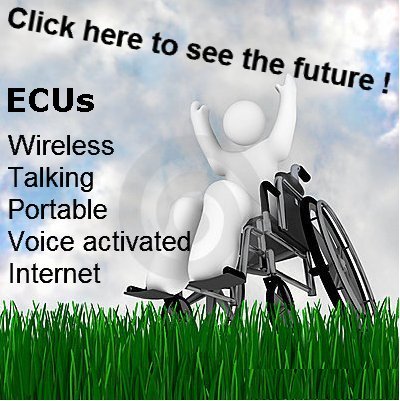
Speak4Use – A voice-activated environmental control unit, Speak4Use was designed to enable vision and mobility impairement to interact with their computer and control their environment, entertainment and computer applications with simple conversational voice commands.

« Newer Posts - Older Posts »

MDTAP | 2301 Argonne Drive, Room T17 Baltimore, Maryland 21218| Voice: 410-554-9230 Toll Free ⁄ Voice 1-800-832-4827|Email: mdtap@mdtap.org