Feed on
Posts
Comments

Chances are, if you’ve been on Facebook or the internet any time in the past few weeks, you’ve seen the ALS Ice Bucket challenge. In fact, half of us have probably even done it (thank you to everyone who has). It’s a tremendous boon to the research supporting finding a cure for ALS and other motor neuron disorders. And although many people have heard of this devastating illness, not many have a complete understanding of just how quickly it can ravage a person.

Often Awesome is a web series that follows the life of a young man shortly after his diagnosis, and documents the physical, emotional and social impact this illness has on him, his wife, and friends. You’ll see his struggles, his hopes and his reliance on assistive technology, as it becomes his only means to communicate as his body shuts down.

Grab your tissues, and don’t miss this chance to learn more about a disease that we all hope to beat.

Webinar: eQuality: The Struggle for Web Accessibility by Persons with Cognitive Disabilities

Date: Thursday – October 16, 2014 Time: 2:00 p.m. – 3:00 p.m. (Eastern Time)

Please join us for this informative discussion on web accessibility​ as BBI Chairman, Dr. Peter Blanck, will discuss and answer questions about his new book entitled “eQuality: The Struggle for Web Accessibility by Persons with Cognitive Disabilities,” Commissioned by the Coleman Institute for Cognitive Disabilities at the University of Colorado and​ published by Cambridge University Press in 2014.

To register for the webinar, please complete the Registration Form. [https://syracuseuniversity.qualtrics.com/SE/?SID=SV_1B9MUgmhxM8cHnn]

It’s that most wonderful time of year when kids return to school, the weather gets cool, and we dive head-first into anything pumpkin flavored. Of course it’s also when we focus a lot of time & energy into thinking about what AT could best meet the needs of students, in and out of school. This week’s review includes a fair amount of that, including lists of “best apps,” tactile books, and more. Check it all out right here – AT News Wrap Up for the week of 8/18 thru 8/22

DynaVox Unveils Dedicated Speech-generating Tablet Global Alliance on Accessible Technologies and Environments

A chair that’s a chair but isn’t there

MIT engineers clothing technology for disabled

Apps to help deaf, hearing people communicate more easily

Make It PrAACtical: Adapted Writing Tool

StopInfo for OneBusAway App Makes Buses More Usable for Blind

PTSD Online Coach: self-help tools to build coping skills

The Internet of Things Could Empower People with Disabilities

Assistive technology is transforming the lives of people with a disability

Back-to-School Guide for Dyslexic Students: Apps and More

Is the solution to wheelchair damage on airlines in the bag?

Now you only have to barely move your hand to control your smart glasses

What Technology Product Would Be the Biggest Help to Older People?

Former automotive engineer designs more user friendly wheelchair

You Don’t Have to Be Able to See to Enjoy Picture Books

Speech Apps to Smart Pens: Tech Aids Students With Learning Disabilities

A 16-Year-Old Google Science Fair Finalist Wants To Help People With Disabilities Communicate With Their Breath

Time lapse video showing how to build an Everest-D V4 braille embosser

New generation of ‘muscle suits’ make light work of heavy lifting

The invention that unlocked a locked-in artist

5 iPhone apps anyone with a #disability should be aware of

Veterans & soldiers w/ ALS now eligible for grants that will help them find accessible homes!

Increasingly, Parents Push For Inclusive Playgrounds

Judge rules case on blind ballot tool will go forward

We hope you’re checking often, but just in case you aren’t, here’s a short list of some of the newest AT listed on Equipment Link. And if you want to see more, visit www.equipmentlink.org.

Lift chair – Free, Port Deposit, MD

Exterior Wheelchair Lift, Kwiklift II – Chevy Chase, MD

U-Step Walker/Rollator – $500, Parkville, MD

Large Clickable Targets

Some mouse users have may have difficulty with fine motor control, so it is important that clickable targets be sufficiently large. Radio buttons and checkboxes should include properly-associated labels (using the <label> element). Small icons or text, such as previous/next arrows or superscript links for footnotes, should be sufficiently large or combined with adjacent text into a single link.

Why Take Pictures If You Are Blind?

Contributed by Lou Smith, Amateur photographer and rehabilitation counselor in Maryland

As a person who is blind and uses an iPhone, this question has been posed to me. The logic behind the question is, as a person who is blind, what kind of enjoyment could I possibly derive from photography?

There are several reasons. First, let’s consider why people with vision take pictures. The rationale varies, but include a desire to share one’s life visually, to show family and friends, or to collect memories of significant events and people in one’s life. A person who is blind could have the same desires or motivations. With the proliferation of smart phones and other such devices, software has been developed to assist people with tasks requiring vision. These include telling the color of a shirt, reading directions, or determining if a light is on or off. I have used my iPhone for all of these practical purposes, and have recently begun delving into photography.

I found an excellent book on the subject published in several formats by National Braille press (www.nbp.org) entitled “Get the Picture” by Judy Dixon.

It has encouraged me to begin exploring this use of my iPhone in more detail.

The first thing that I realized is that while my iPhone gives me some information on the photograph (lighting level, whether the photo is blurry or clear, the presence or absence of people’s faces), it is valuable to seek out sighted assistance for opinions. I have made plenty of mistakes in my brief foray into this realm. I took a panoramic picture of our living room and sent it to my wife who was out of town at the time. She told me that the photo was “various shades of dark.” I was puzzled. She asked me if I had turned the lights on. As I took the picture at about ten in the evening, my error provided considerable amusement. I was so excited about figuring this stuff out that I forgot to turn on the lights.

Another thing I learned is that I have to be cautious about holding the camera too low. I have taken nice pictures of floors, however that was not my intent.

I  didn’t realize that most photos are taken with the camera in landscape orientation. For some  reason I just held the camera vertically, assuming that’s the way all photos were taken. Thanks, Ms. Dixon, for telling me this in the book.photo (4)

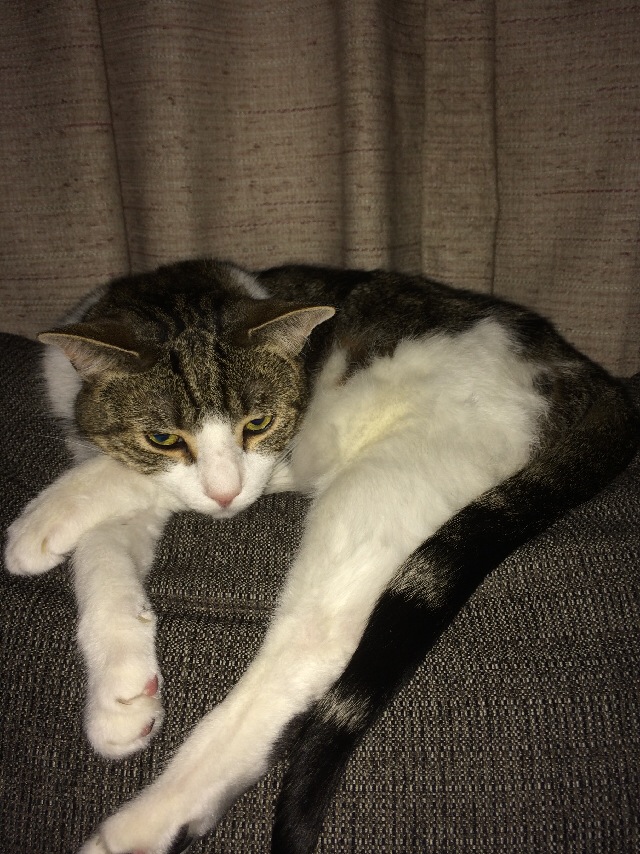
I quite by accident took a good picture of my cat, lounging on the back of our loveseat. My wife thought it was so good, she insisted I post it on Facebook. I took the picture by putting my hand on Merlin’s head, and backing the camera away a few feet and snapping the picture.

I have always had an interest in what things look like. I believe I am getting a chance to experience my world from a visual perspective through taking pictures. People can describe what my pictures look like, and it gives me a different perspective than what I previously had. I have also learned a little more about visual fields. And on an elemental level, I learned (in a rather amusing way), the importance of light.

It would be interesting to hear about perspectives of others who are visually impaired on photography.

 

« Newer Posts - Older Posts »

MDTAP | 2301 Argonne Drive, Room T17 Baltimore, Maryland 21218| Voice: 410-554-9230 Toll Free ⁄ Voice 1-800-832-4827|Email: mdtap@mdtap.org

