Feed on
Posts
Comments

Link Type Indicators

It is a good idea to inform users when a link goes to non-HTML content (such as a PDF file or Word document). It can be frustrating to activate a link and then realize that the link requires an external program or viewer. An icon (with appropriate alternative text) or text, such as “(PDF)”, is sufficient. Because screen reader users commonly navigate by links, it is vital that the link type indicator icon or text be placed within the link, otherwise this information is readily available to sighted users, but not presented in the context of the link for screen reader users.

Where To Go:  A Directory of Airport Animal Relief Areas

This is a very straightforward app which gives a short description of how to find the animal relief areas for many North American airports. After installation, the icon is titled “Service Animal.”  At start-up, a series of buttons are presented, the second one from the top, “Dog Relief Areas,” shows an alphabetical list of Airports.  The city, name of airport and airport code are listed.

The “Where To Go” button functions fairly well using VoiceOver, though there are a couple of accessibility issues. The airport list is scrollable by flicking or with the 3-finger scrolling gesture.  This is not the typical iOS interface  for this sort of information, and hence, the “table index”portion of the control is not available. This sounds like a minor accessibility issue, but scrolling to the listings under the letter O can be tedious.  The app appears to be otherwise accessible; however, the FAQ section fails to read properly and getting the “Back” button to respond is difficult.

This is a free app which was tested using an iPhone 4, running iOS 5.1.  The iTunes store link is:

http://itunes.apple.com/us/app/where-to-go-directory-airport/id501637422?mt=8 

The New American Foundation for the Blind Website

The American Foundation for the Blind recently redesigned their homepage (http://www.afb.org.)  A great deal of information is available regarding all aspects of blindness.  Their new Website works well under all of the browsers we tested and while it is a large and busy homepage, it is easily navigable.  Particularly worth noting are the local services finder, message boards and a link to the excellent AccessWorld publication.

Share and enjoy.

AT in the news for the week of 3/26 – 3/20

Blind Man Drives Car

Fab accessibility resource for web writers

High-tech Braille devices are touching the lives of blind Canadians

Top 10 “coolest” designed hearing aids

GeckoSystems Continues Mobile Robot Technology

Kyoto prof rolls out omnidirectional wheelchair

Hadley School operates a Yahoo Group discussion for blind business owners

App Development Offers Niche For Adults With Autism

German researchers develop assistant Robot FRIEND for people with disabilities

Custom Homes Set New Standard for Injured US Soldiers

Self-driving cars get closer every day

Hugh Herr: The Man Who Thinks Tech Can End Disability

Lakay Roberts, Texas 5-Year Old With Cerebral Palsy, Denied Use Of ‘Unsafe’ Walker At School

Robotic device helps paraplegics stand, company says

Article by Joel Zimba, Special Projects Coordinator, MDTAP

Some months back there was an announcement of a haptic SONAR  device called Tacit.

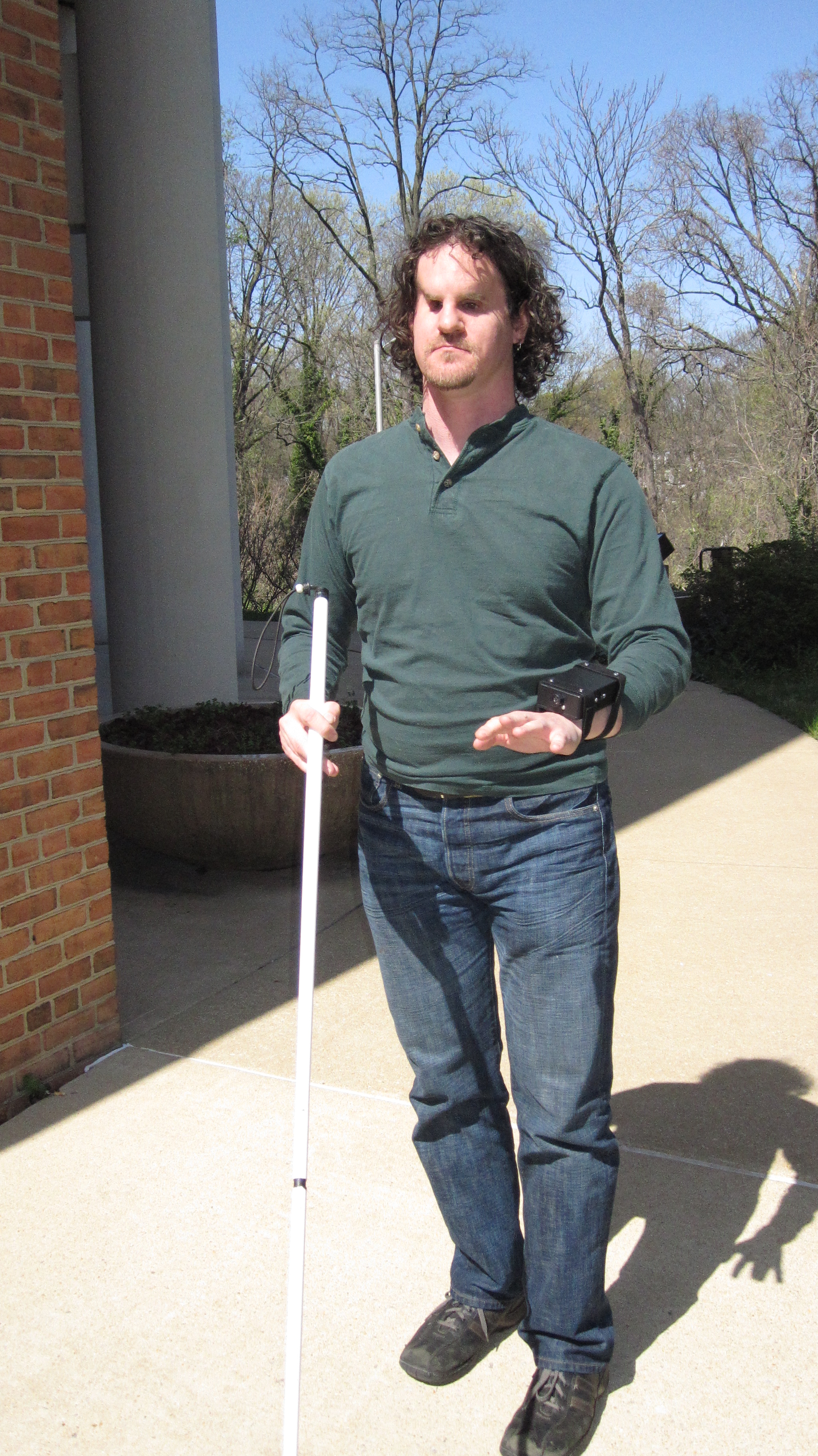
It is a DIY sort of project developed by Grathio Labs. The schematic along with code for the micro-controller was posted on the inventor’s website. I wrote an article on the Assistive Technology Blog about Tacit and how its approach differed from that of similar devices. Close up of Joel wearing the sonar device
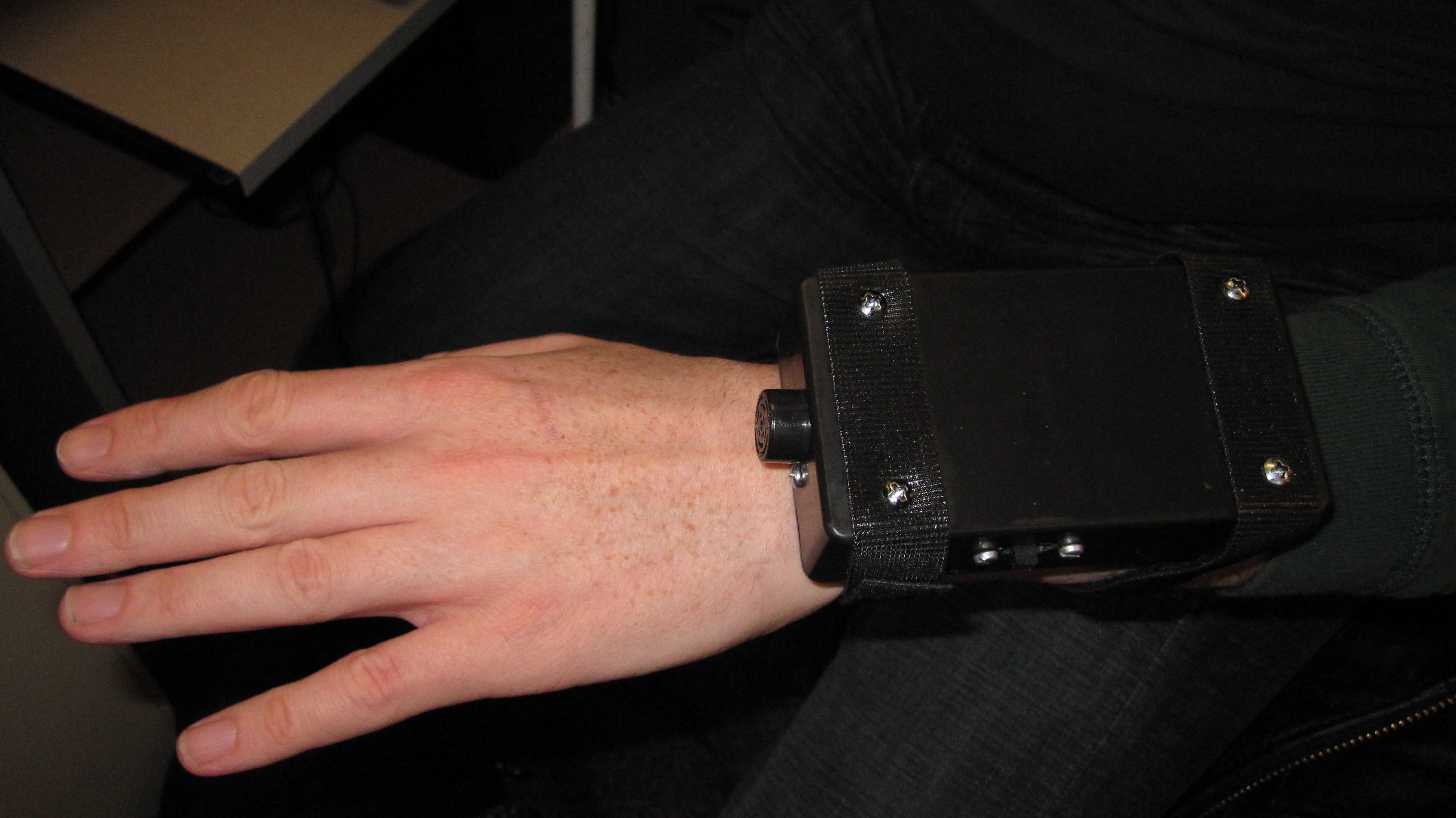
I finally have a prototype device, which was constructed by two engineers from the University of Maryland Baltimore Campus.  There were several challenges involved in the initial development, including some inconsistencies in the original schematics  as well as some unexpected hardware issues.  The result is a scaled-down version which is a great proof-of-concept and a first step toward a usable device.

The current incarnation is built around a standard plastic project box.

The two ultrasonic sensors working in parallax have been reduced to 1, and the corresponding feedback motors have been similarly halved.  Two strips of Velcro attach the device to the back of the wrist.  A pin connected to the motor moves to a greater or lesser degree depending on object proximity.

The idea is that as the sound waves bounce off of an object, the time it takes to receive the echo can be  used to calculate the distance between the wearer and the object.  The sampling rate of 6 readings per second sounds very fast, but an error checking algorithm reduces the number of usable samples. The feedback effect is analogous to stop action video.

In practice, I had to walk quite slowly to clearly scan across from right to left and get back any reliable information.  Large objects and known landmarks were the easiest for me to locate, while  irregularly shaped things, such as trees and cars proved  more difficult especially depending upon the angle and height of the sensor.  One way in which I was very successful was navigating a known surface from a greater distance.  For example, I could walk down the middle of a sidewalk with the walls of buildings on one side of me.  By angling the device toward the wall at a 45 degree angle, I could tell from about ten feet away when there was an opening in the wall.  While this of course can also be done with a standard straight cane, the distances involved are much greater.
While there are several drawbacks to the current prototype, I can see how this could be made into a very useful mobility aid.  Adding the second ultrasonic sensor and feedback motor would  greatly  increase my ability to judge the size, shape and location of objects.  Of course miniaturization and overall performance  are a given once the basic principles have been worked out.  Stay tuned to see how this exciting project develops.
WCAG 2.0 and Reading Level

It is always a good idea to make content as readable and understandable as is suitable for the audience. For complex content (defined as that which requires a reading ability more advanced than the lower secondary education level), WCAG 2.0 Success Criterion 3.1.5 (Level AAA) requires that a more simplified and readable version of the content be provided. Much content cannot be made perfectly understandable at these levels (consider a college-level chemistry class, for example), thus it’s a Level AAA success criterion. Regardless of the limitations for some content, for a page to be optimally accessible, it should be written so as to be easily readable and understandable to the target audience.

« Newer Posts - Older Posts »

MDTAP | 2301 Argonne Drive, Room T17 Baltimore, Maryland 21218| Voice: 410-554-9230 Toll Free ⁄ Voice 1-800-832-4827|Email: mdtap@mdtap.org